
The Forms section allows patients to view important documents and forms that are assigned to them by their therapist. These documents may include consent forms, privacy policies, therapy agreements, or other required paperwork related to the treatment process.
Patients can access these forms from the Profile section of the patient application.
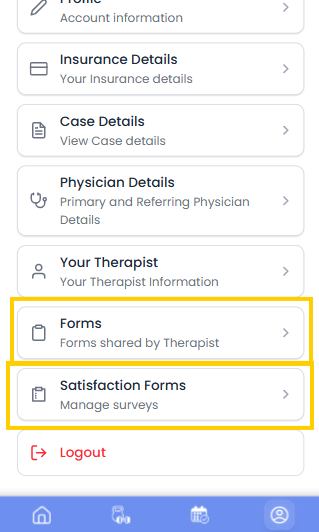
Viewing Assigned Documents #
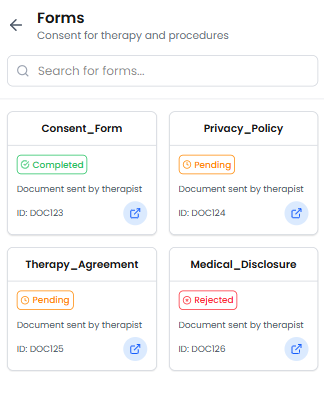
When a therapist assigns documents to a patient, they will appear in the Forms section in a grid layout.
Each document card contains:
- Document Name
- Document ID
- Status Indicator
- View/Open option
Patients can click on the open icon to view the document.
Document Status
Each document shows its current status so patients can easily track whether it has been completed or still requires action.
- Completed – The document has been signed by both the patient and the therapist.
- Pending – The document is awaiting signatures.
- Rejected – The document has been rejected and may require further action.
Signing Documents #
Patients can view documents directly inside the application, but the signing process is completed through email verification.
- The therapist assigns the document to the patient.
- The patient can view the document inside the application.
- To sign the document, the patient will receive an email notification.
- The patient must open the email and complete the signature process from the email link.
- Once both the patient and therapist sign the document, its status will automatically change to Completed in the application.
Satisfaction Forms #
The Satisfaction Forms section allows patients to view surveys or feedback forms related to their therapy sessions.
These forms are typically used to collect patient feedback about treatment progress and overall experience.
In the Satisfaction Forms section, patients will see a list of surveys in a table format.
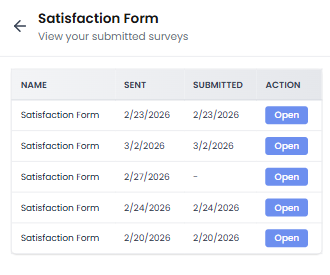
Each entry displays:
- Form Name
- Date Sent
- Date Submitted
- Action Button
To view a form:
- Click the Open button in the Action column.
- The selected form will open so the patient can view the submitted information.
This section helps patients keep track of feedback forms and previously submitted surveys.


