
The Treatment Plan section allows patients to perform the exercises assigned by their therapist and track their progress throughout the treatment program.
Patients can access and complete their exercises directly from this section.
Accessing the Treatment Plan
To begin the treatment process:
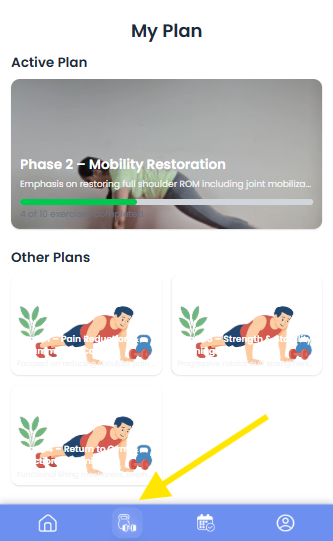
- Tap the Treatment Plan icon in the bottom navigation bar.
- The screen will display two sections:
- Active Plan – The currently ongoing treatment plan.
- Other Plans – Plans that are completed or no longer active.
Patients should select the Active Plan to continue their current therapy program.
Viewing Daily Exercises
After opening the Active Plan, the patient will see a list of exercises assigned for the current day.
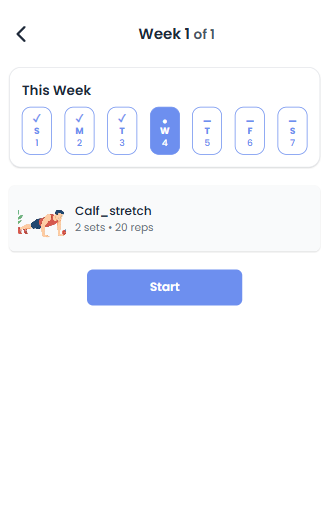
Each exercise in the list will display relevant details such as:
- Exercise name
- Instructions or description
- Assigned sets and repetitions
To begin an exercise click Start.
Performing the Exercise
Once the exercise starts, a video demonstration will be displayed to guide the patient through the correct movement.
The exercise screen also shows the required exercise parameters:
- Repetitions (Reps) – Number of times the movement should be performed.
- Hold Duration – How long the position should be held.
- Sets – Number of times the repetitions should be repeated.
Patients should carefully follow the video instructions while performing the exercise.
After completing the required sets:
- Click the Right Arrow (Next) button located below the video.
- This will move the patient to the next step.
Post-Exercise Survey
After completing the exercise, the patient will be asked to fill out a short survey form.
This survey helps therapists understand how the patient is responding to the treatment.
The survey may include questions such as:
- Pain Level
- Effort Level
- How you felt after the exercise
- Additional comments or feedback
Patients should answer these questions honestly to help therapists adjust the treatment plan if necessary.
Exercise Completion
Once the survey is submitted:
- The exercise will be marked as completed.
- A check mark will appear indicating that the exercise for that day has been successfully finished.
This completion will also contribute to updating the overall treatment progress displayed on the dashboard.


