
After logging in, patients are redirected to the Dashboard, which provides a quick overview of their treatment progress, exercises, and upcoming sessions. The dashboard helps patients easily track their recovery journey and stay informed about their treatment plan.
Weekly Exercise Tracker
At the top of the dashboard, patients can see the Weekly Exercise Tracker.
This section shows the current week’s exercise activity, allowing patients to quickly identify which exercises have been completed.
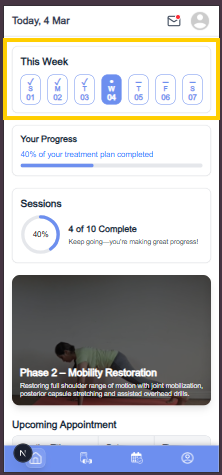
Indicators in the Tracker
Each day in the week has a status indicator:
- ✓ Check Mark – The exercise for that day has been completed successfully.
- ● Dot (Current Day) – Indicates the current day, and the exercise has not yet started.
- – Dash – The exercise for that day has not been completed.
This tracker helps patients maintain consistency with their therapy exercises.
Treatment Progress
Below the weekly tracker, the Treatment Progress Bar displays the overall progress of the patient’s current treatment plan.
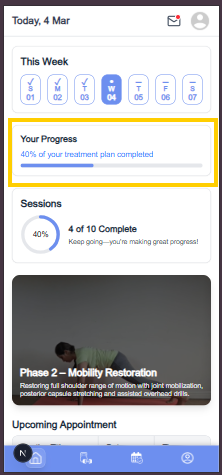
The progress bar shows:
- The percentage of the treatment plan completed
- A visual representation of how far the patient has progressed
Example:
0% of your treatment plan completed
As the patient completes exercises and sessions, the progress bar will update automatically.
Session Analysis
The Sessions section provides a summary of therapy sessions.
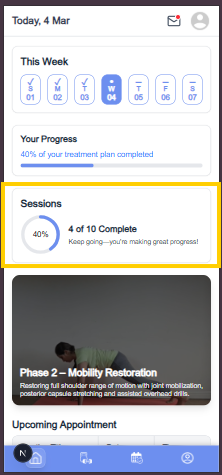
It shows:
- How many sessions have been completed
- Total number of sessions assigned
Example:
0 of 0 Complete
This section also includes a visual progress indicator to help patients easily track their session completion.
Current Treatment Plan
The Current Treatment Plan section displays the treatment plan that is currently active.
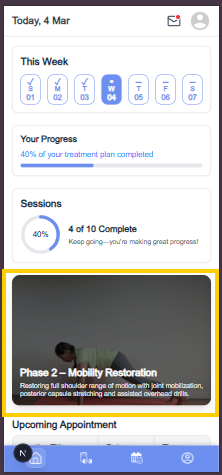
Patients can:
- View their ongoing treatment program
- Tap on the treatment plan to open detailed exercises and instructions
This allows patients to easily access and follow their prescribed therapy program.
Upcoming Sessions
Below the treatment plan, patients can view their Upcoming Sessions.
These sessions are displayed in a table format and include important details for reference.
Session Information Displayed
The table shows:
- Meeting Title
- Session Date
- Session Time
This helps patients stay informed about their upcoming appointments and prepare for their scheduled therapy sessions.


